
Best Cheap Gaming PC Under $200 (2026): The Real Refurbished Build Plan
If you searched for the best cheap gaming PC under $200, you’re probably trying to get a real, playable machine on a strict budget—not a “parts list” that secretly costs $500. In 2026, a complete brand-new gaming PC under $200 isn’t realistic, but a refurbished office PC + smart upgrades can absolutely get you into esports and lighter gaming.
This guide is a step-by-step tutorial built around what actually works in the US market: buy a reliable refurbished base system (Dell/HP/Lenovo business desktops), then upgrade the small number of parts that unlock gaming performance.
Table of Contents
- Can you really build under $200?
- The $200 strategy (in 60 seconds)
- Shopping carts: $200-ish and best value near $250
- Step 1: Pick the right refurbished PC base
- Step 2: Add a GPU that fits (SFF vs Tower)
- Step 3: SSD upgrade (feel-fast upgrade)
- Step 4: RAM upgrade (16GB target)
- Step 5: Power/PSU and connector rules
- Avoid these mistakes
- Troubleshooting
- FAQ
Can you really build a gaming PC under $200?
With new parts: usually no. A modern CPU + motherboard + RAM + storage alone tends to blow the budget.
With refurbished + used upgrades: yes—especially for esports titles like Valorant, League of Legends, Rocket League, and Fortnite Performance Mode. You are trading “latest AAA ultra settings” for “playable, upgradeable, cheap”.
The $200 strategy (in 60 seconds)
- Buy a refurbished business desktop (OptiPlex/ProDesk/ThinkCentre) with an i5, RAM, and Windows.
- Add an SSD if it still has a hard drive.
- Add a low-power used GPU that fits your case (low-profile for SFF).
- Upgrade to 16GB RAM if needed.
Two example shopping carts (budget targets)
| Cart | What you buy | Target total | Best for |
|---|---|---|---|
| $200-ish | Refurb PC (i5 + 8GB) + SSD (if needed) + very low-power GPU or delay GPU | $180–$220 | Light gaming + upgrade path |
| Best value near $250 | Refurb PC + 16GB RAM + SSD + GTX 1650 LP (or similar) | $230–$280 | Smoother 1080p esports |
Step 1: Pick the right refurbished PC base
Start with the base machine first. If you choose a good base, every upgrade becomes easier and cheaper.
Step 2: Add a GPU that fits (SFF vs Tower)
SFF cases require low-profile GPUs. Towers give more flexibility. Always check fit and power connectors before buying.
Step 3: SSD upgrade
If you still have a hard drive, upgrading to SSD is your “make it feel fast” upgrade.
Step 4: RAM to 16GB
16GB helps reduce stutter and improves overall usability.
Step 5: Power/PSU rules
Choose low-power GPUs if your PSU is limited. Don’t rely on random adapters.
Recommended components (with photos + links)
Refurbished Office PC Base (Example: Dell OptiPlex 7050 SFF)
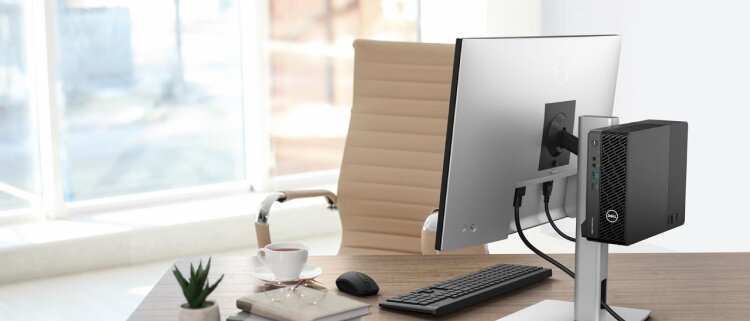
This is the foundation that makes an under-$200 build possible. Business desktops bundle the expensive stuff—CPU, motherboard, case, and power supply—into one cheap refurbished purchase. You’re buying “platform value” instead of trying to piece together new parts that don’t fit the budget.
What to look for: an Intel i5 (6th–8th gen is a sweet spot), at least 8GB RAM, and ideally an SSD. If it comes with a hard drive, plan to add a SATA SSD. If the case is SFF (small form factor), you must choose a low-profile GPU later.
Alternatives that often work similarly: HP ProDesk/EliteDesk 600-series and Lenovo ThinkCentre M-series. The best unit is the one with the right price, right condition, and the right upgrade room.
GPU Upgrade (Example: NVIDIA GeForce GTX 1650 Low Profile)
The GPU is the biggest FPS upgrade. For SFF desktops, a low-profile card is the safest choice. The GTX 1650 LP is popular because it offers strong esports performance while staying within power limits (often no external power connector required).
Fit rules matter: confirm low-profile bracket, card length, and whether your case can accept a dual-slot cooler. Many cheap builds fail because the GPU simply doesn’t fit or needs power cables the office PSU doesn’t have.
Alternatives: GTX 1050 Ti (older but often cheap), RX 560, or GT 1030 (only for very light gaming). Always prefer the strongest low-power card your budget allows.
SSD Upgrade (Example: Crucial MX500)
If your refurbished PC still uses a hard drive, an SSD upgrade is mandatory. It won’t magically double FPS, but it will make Windows boot fast, games load quicker, and the whole PC feel modern. This is often the best “quality-of-life” upgrade per dollar.
SATA SSDs are ideal for this budget because they work in almost every refurbished desktop. Aim for 500GB minimum; 1TB is better if you install multiple games.
Alternatives: WD Blue SATA SSDs, Samsung SATA SSDs, or any reputable brand. Avoid unknown/no-name drives for your system disk.
RAM Upgrade (Example: Crucial DDR4 Memory)

Many refurbished PCs ship with 8GB RAM. That can run Windows and light gaming, but 16GB is the practical target for smoother gameplay and fewer stutters—especially if you multitask with Discord, Chrome, or streaming music.
Important: match the RAM type (DDR3 vs DDR4) and speed your system supports. Dual-channel (two sticks) is usually better than a single stick, and it helps minimum FPS stability in many games.
Alternatives: Kingston, Corsair, and other mainstream kits. If you’re unsure, search using your exact PC model + “RAM type” first.
Wi‑Fi Adapter (Optional: TP‑Link USB Wi‑Fi)

If your base desktop doesn’t include Wi‑Fi, a small adapter can save time. For gaming, Ethernet is best, but Wi‑Fi is still fine for many players if your signal is stable.
A USB adapter is the quickest solution. If you want better stability, consider a PCIe Wi‑Fi card—if your desktop has an open slot.
Alternatives: USB Wi‑Fi 5/6 adapters from reputable brands. Avoid the cheapest unknown dongles; they can cause disconnects and poor latency.
Avoid these mistakes
- Buying an SFF desktop then ordering a full-height GPU
- Buying a GPU that needs 6/8-pin power when your PSU doesn’t have it
- Staying on a hard drive and wondering why everything feels slow
- Overspending on cosmetics instead of SSD/RAM/GPU
Troubleshooting (quick fixes)
- No display after GPU install: move monitor cable to the GPU, not motherboard
- PC won’t boot: re-seat RAM and GPU; confirm GPU power requirements
- High temps: clean dust, add a cheap case fan, ensure airflow isn’t blocked
- Low FPS: update GPU drivers; lower settings; verify dual-channel RAM
FAQ
Can I build this without a GPU?
Yes. Start with the refurb PC + SSD + RAM, then add the GPU later. You’ll be limited to very light gaming until the GPU upgrade.
Do I need Windows?
Most refurbished business PCs include Windows. Verify the listing details.
Is low-profile GPU required?
Only if your case is SFF. Towers can fit full-height GPUs.
What games run best?
Esports titles and older AAA games. Modern AAA will be limited until you upgrade GPU.
Should I buy a GT 1030?
Only if your budget is extremely tight. A GTX 1050 Ti / GTX 1650 class is a much better experience.
How do I know if RAM is DDR3 or DDR4?
Check the CPU generation and your exact model specs (or the listing).
What PSU wattage do I need?
Many office PCs use small PSUs; choose slot-powered GPUs or move to a tower/ATX PSU build if you want bigger GPUs.
How much SSD storage is enough?
500GB minimum, 1TB recommended if you install multiple games.
Can I upgrade CPU later?
Sometimes, but under-$200 builds usually benefit more from GPU/SSD/RAM upgrades first.
Is this better than a cheap prebuilt?
Often yes for value, as long as you choose compatible parts and upgrade carefully.
Bottom line: under $200 gaming is real when you use the refurb strategy. Build a stable base first, then upgrade the GPU when you can.

what’s a good case to buy that is cheap. so I can put all the stuff in.
DEEPCOOL MATREXX 30 – is best for the money.
Added in the last of my list.