Best Mini ITX Motherboards: Top AM5 & Intel Picks (2026)
Mini ITX builds leave zero room for buyer's remorse. We tested top AMD AM5 and Intel boards to find which tiny platforms actually stay cool under heavy loads.
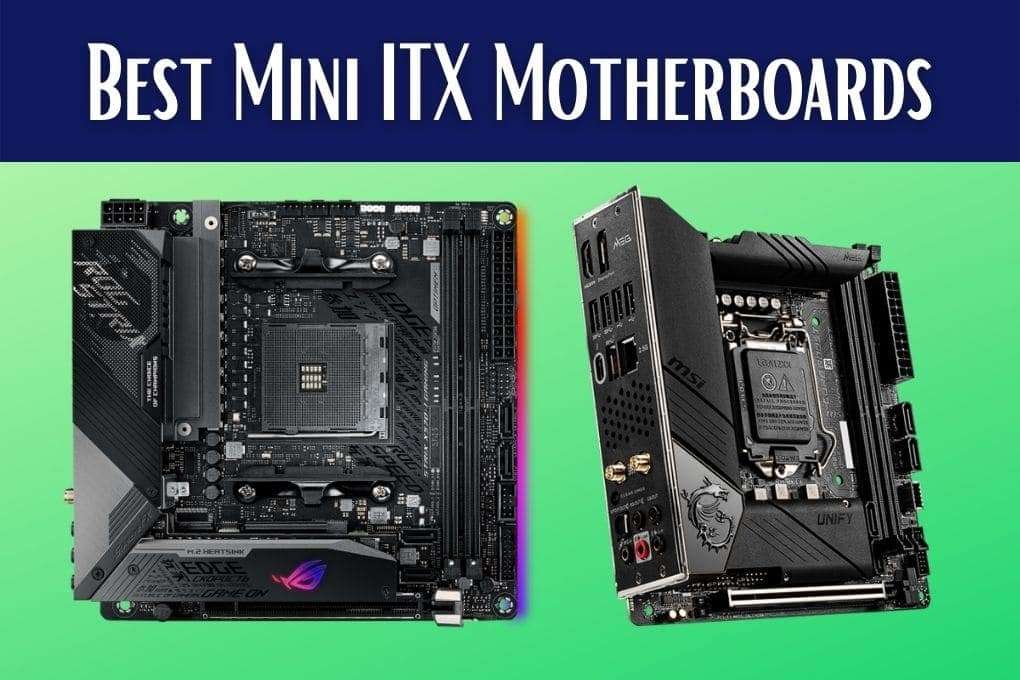
The Short List: Quick Mini ITX Picks
For most builders in 2026, the Gigabyte B650I Aorus Ultra is the smartest AMD AM5 pick, balancing sane pricing with dual Gen4 M.2 slots and quiet cooling. If you are locked into Intel LGA 1700, the ASRock B760I Lightning WiFi offers the cleanest power delivery under $200, while the ASUS ROG Strix X870-I remains the benchmark for enthusiast builds that require USB4 and full PCIe 5.0 lanes.
- Best AM5 All-Rounder: Gigabyte B650I Aorus Ultra (Reliable VRMs, clean layout, sensible price)
- Best Enthusiast AM5: ASUS ROG Strix X870-I Gaming WiFi (Dual USB4, PCIe 5.0, active VRM cooling)
- Best Value Intel: ASRock B760I Lightning WiFi (DDR5-7200 support, strong 8-phase power)
- Best High-End Intel: ASUS ROG Strix Z790-I Gaming WiFi (Dual Thunderbolt 4, external ROG Hive)
- Best Ultra-Budget AM5: Gigabyte A620I AX (Ideal for 65W Ryzen chips and APUs)
- Best White Aesthetic: Gigabyte X870I Aorus Pro Ice (110A power stages, all-white PCB)
Mini ITX Spec Comparison: AMD AM5 vs. Intel LGA 1700
Comparing small form factor (SFF) boards requires checking thermal dissipation and lane splitting alongside raw specs. Here is how our top picks stack up side by side:
| Motherboard | Socket / Chipset | VRM Power | PCIe & M.2 Support | Rear High-Speed I/O | Best CPU Pairing |
|---|---|---|---|---|---|
| ASUS ROG Strix X870-I | AM5 / X870 | 10+2 (110A) | PCIe 5.0 x16 / 1x Gen5 + 1x Gen4 | Dual USB4 (40Gbps) | Ryzen 7 7800X3D / 9800X3D / 9950X |
| Gigabyte B650I Aorus Ultra | AM5 / B650 | 8+2+1 (105A) | PCIe 4.0 x16 / 2x Gen4 | USB 3.2 Gen 2x2 Type-C | Ryzen 5 7600 / 9600X / 7800X3D |
| Gigabyte X870I Aorus Pro Ice | AM5 / X870 | 8+2+1 (110A) | PCIe 5.0 x16 / 1x Gen5 + 1x Gen4 | USB4 (40Gbps) + Wi-Fi 7 | Ryzen 7 9700X / 9800X3D |
| Gigabyte A620I AX | AM5 / A620 | 5+2+1 (50A) | PCIe 4.0 x16 / 1x Gen4 | USB 3.2 Gen 2 Type-C | Ryzen 5 7600 / Ryzen 7 8700G |
| ASUS ROG Strix Z790-I | LGA 1700 / Z790 | 10+1 (105A) | PCIe 5.0 x16 / 1x Gen5 + 1x Gen4 | Dual Thunderbolt 4 (40Gbps) | Core i7-14700K / i9-14900K |
| ASRock B760I Lightning WiFi | LGA 1700 / B760 | 8+1+1 (50A) | PCIe 5.0 x16 / 2x Gen4 | USB 3.2 Gen 2 Type-C | Core i5-13600K / i5-14600K |
| Gigabyte H610I | LGA 1700 / H610 | 4+1+1 (Discrete) | PCIe 4.0 x16 / 1x Gen3 | USB 3.2 Gen 1 | Core i3-12100 / i5-13400 |
Top AMD AM5 Mini ITX Motherboards
AMD committed to supporting the AM5 socket through 2027 and beyond, making it the superior platform choice if you plan on dropping in a new processor two or three years down the line. Because AM5 chips run power-efficiently at 65W to 120W TDPs, these boards run noticeably cooler in cramped sub-15L enclosures than their Intel counterparts.
Gigabyte B650I Aorus Ultra — The Sensible Choice
We rate the Gigabyte B650I Aorus Ultra as the sweet spot of the entire SFF market. You get heavy heatsinks, three total M.2 slots (stacked on a clever daughterboard), and zero whining VRM fans. The board skips Gen5 GPU lanes—which do not matter for modern graphics cards anyway—and spends its bill of materials on stable memory traces and cool VRMs. It easily drives a Ryzen 7 7800X3D or Ryzen 9 9900X without thermal drop-offs.
ASUS ROG Strix X870-I Gaming WiFi — The High-End Standard
If you need dual 40Gbps USB4 ports for external NVMe arrays, capture devices, or high-end docks, the X870-I is the board to beat. ASUS uses an active cooling solution for both the power delivery and the primary Gen5 SSD. The fan profile is customizable in BIOS, meaning you can keep it dead silent under typical desktop loads. It carries a steep price tag, but it packs workstation-grade I/O onto a 17x17cm footprint.
Gigabyte A620I AX — Best for Budget APU Builds
Building a sub-$700 living-room rig or emulation box? Don't spend $250 on a motherboard. The Gigabyte A620I AX pairs perfectly with APUs like the Ryzen 7 8700G or efficient 65W chips like the Ryzen 5 7600. You surrender PCIe 5.0, high-speed secondary M.2 slots, and extreme CPU overclocking, but you retain reliable DDR5 support and built-in Wi-Fi 6 without blowing your budget.
Top Intel LGA 1700 Mini ITX Motherboards
Intel LGA 1700 is a mature, end-of-life platform spanning 12th, 13th, and 14th Gen chips. Because socket LGA 1700 will not receive future CPU releases, these boards make sense if you find steep discounts on hardware or already own a fast Raptor Lake processor.
ASRock B760I Lightning WiFi — Sane Performance for i5 and i7
Intel K-series processors run hot, but you do not need an overpriced Z790 board to run them at stock clocks. The ASRock B760I Lightning features 50A DrMOS power stages that comfortably handle an i5-14600K or i7-14700 under sustained multi-core workloads. ASRock did not clutter the board with proprietary daughtercards, making CPU cooler installation painless inside cases with tight clearance like the FormD T1 or Fractal Ridge.
ASUS ROG Strix Z790-I Gaming WiFi — Overbuilt Flagship
The Z790-I is an engineering showcase. It moves audio hardware and diagnostic controls off the PCB entirely into the external ROG Hive desk module, freeing up board space for massive stacked heatsinks and dual Thunderbolt 4 controllers. It is expensive and overkill for gaming, but creative pros needing maximum throughput on Intel hardware will find it worth the premium.
Gigabyte H610I — The Sub-$120 Stopgap
We only recommend the H610I for budget-constrained home server builds, basic office terminals, or low-cost HTPCs using an Intel Core i3-12100 or i5-12400. Power delivery is barebones, memory speeds are capped, and there is no built-in wireless card. For basic tasks, it gets the job done without wasted expense.
SFF Realities: What the Spec Sheets Hide
Selecting a Mini ITX board requires evaluating physical clearance just as much as chipset features. Keep these three factors in mind before clicking buy:
- CPU Cooler Backplate & Socket Clearance: Mini ITX sockets sit dangerously close to the top PCIe slot and memory DIMMs. Bulky low-profile coolers like the Noctua NH-L12S or Thermalright AXP90-X47 can collide with tall VRM heatsinks or stacked M.2 heatsink blocks. Check manufacturer compatibility lists before ordering your cooler.
- Daughterboards & Case Riser Cables: Boards using multi-layer daughtercards for audio and storage (like the ASUS ROG Strix series) add significant vertical height near the bottom half of the socket. If you are building in a sandwich-style case with a tight PCIe riser spine, double-check that your riser cable can curve cleanly around the rear PCB components.
- Active VRM Fan Noise: High-end X870 and Z790 Mini ITX boards often incorporate tiny 30mm or 40mm fans inside the rear I/O shield to cool the power stages. Tiny fans spin fast and can introduce a high-pitched hum. Set custom fan curves in the BIOS immediately after your first boot to prevent them from spinning up during idle operation.
FAQ
Can a Mini ITX motherboard handle a flagship CPU like the Ryzen 9 9950X or Core i9-14900K?
Yes, provided you choose a board with 105A or 110A power stages like the ASUS ROG Strix X870-I or Z790-I. However, the bottleneck in Mini ITX builds is almost always cooling the CPU itself rather than the motherboard. A 240mm or 280mm AIO liquid cooler is strongly recommended if you run high-wattage 16-core and 24-core chips in compact cases.
Do I need PCIe 5.0 on a Mini ITX motherboard in 2026?
For gaming, no. Modern graphics cards like the RTX 4080 Super and RX 7900 XTX do not saturate a standard PCIe 4.0 x16 slot, resulting in less than a 2% performance difference compared to Gen5. PCIe 5.0 is only beneficial if you regularly transfer multi-gigabyte files across Gen5 NVMe solid-state drives.
Why do Mini ITX motherboards only have two RAM slots?
The standard Mini ITX form factor is strictly limited to 170mm by 170mm. Because of physical space constraints alongside trace routing for the CPU socket and PCIe slots, fitting four DIMM slots is impossible. Two-slot topologies actually offer cleaner signal integrity, allowing Mini ITX boards to support very high memory overclocks, often exceeding DDR5-8000.