Cheapest Z390 Motherboards: Used Market Buying Guide
If you are keeping an Intel 8th or 9th Gen CPU alive on a tight budget, these are the cheapest Z390 motherboards worth buying on the secondhand market.
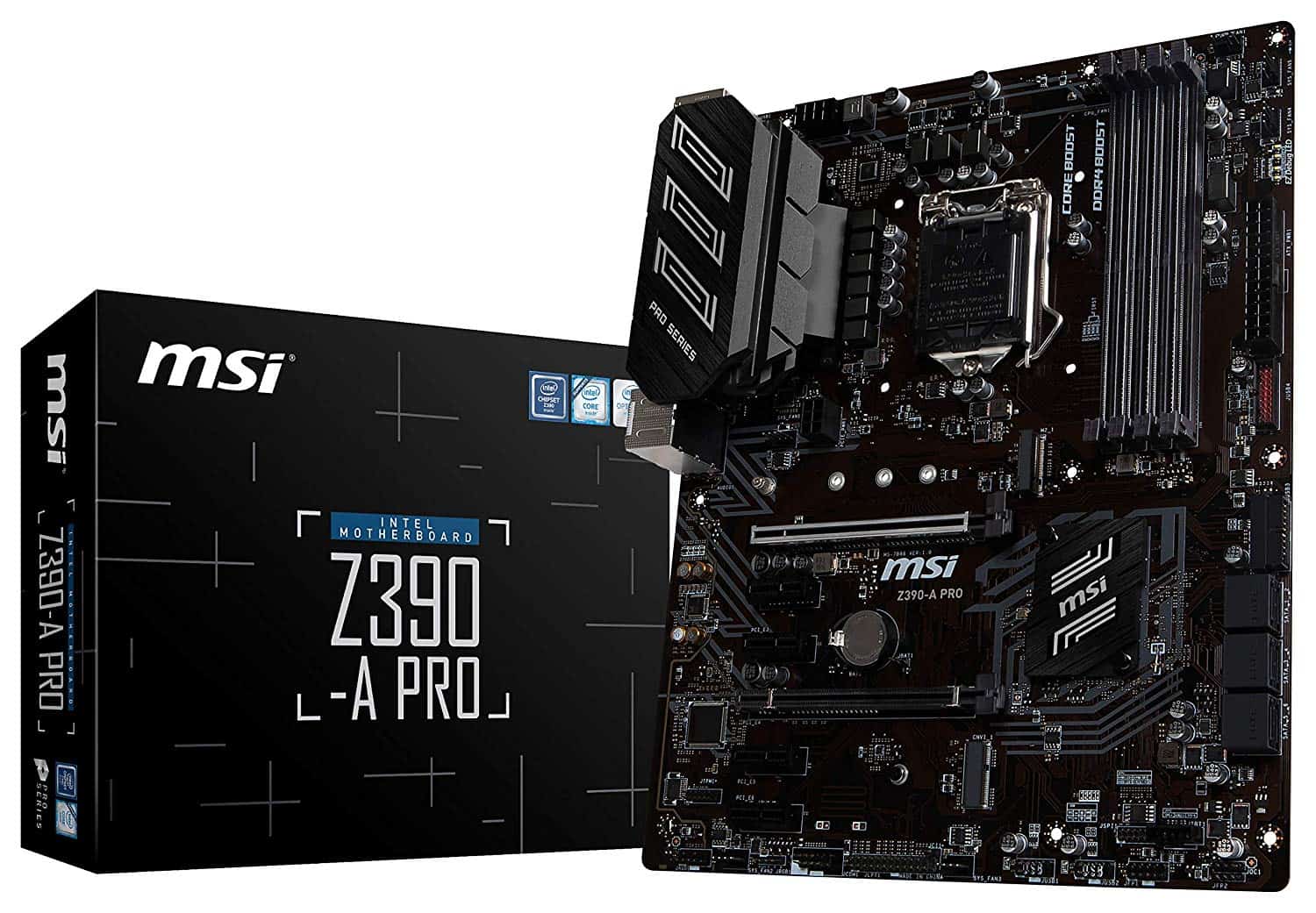
The cheapest Z390 motherboard worth buying right now is the MSI Z390-A PRO, which regularly sells on the used market for $65 to $80. If you need a reliable replacement board to keep a Core i7-8700K or i5-9600K running without overspending on an older platform, it delivers what you need and strips out the rest.
Because Intel phased out the LGA 1151 socket years ago, buying a Z390 board today means navigating the secondhand market on eBay, Reddit’s r/hardwareswap, or local listings. Retailers still stocking sealed Z390 inventory often charge ridiculous legacy prices north of $200. Do not pay that. At that price, you could buy a brand-new B760 motherboard and a faster modern processor.
Quick Picks: Budget Z390 Motherboards
- Best Overall Budget Pick: MSI Z390-A PRO ($65–$80 used) — clean layout, reliable BIOS, handles 6-core chips easily.
- Best Budget VRM: Gigabyte Z390 UD ($70–$85 used) — decent power delivery for the price, better heat tolerance on stock 8-core chips.
- Cheapest Functional Option: ASRock Z390 Pro4 ($55–$70 used) — barebones design, best limited to Core i3 and i5 processors.
MSI Z390-A PRO: The Reliable Baseline
The MSI Z390-A PRO was the default entry-level Z390 recommendation during the 9th Gen era, and it remains the safest used purchase today. It gives you four DDR4 DIMM slots supporting memory overclocks past 4000 MHz, a full PCIe 3.0 x16 slot reinforced with steel armor, and an M.2 slot for an NVMe SSD.
Where MSI saved money is obvious. You get an entry-level Realtek ALC892 audio codec, no integrated Wi-Fi, basic rear I/O connectivity, and lightweight aluminum heatsinks on the power delivery. For a 65W chip like the Core i5-8400 or an overclocked i5-9600K, this board runs without breaking a sweat. If you drop a Core i9-9900K into it and push heavy Blender rendering passes, those VRM heatsinks will get uncomfortably hot. Keep high-airflow case fans pointed at the top of the board if you run an 8-core chip.
Budget Contenders: Gigabyte Z390 UD and ASRock Z390 Pro4
If you cannot find the MSI board at a reasonable price, two other budget models show up frequently in used listings:
Gigabyte Z390 UD
The Gigabyte Z390 UD (Ultra Durable) actually features a slightly better power delivery setup than the MSI Z390-A PRO. It uses a 10+2 phase configuration (doubled 4-phase with discrete OnSemi MOSFETs) that handles sustained workloads with less thermal throttling. The trade-off is Gigabyte’s clunky BIOS interface and barebones rear port selection. If you found a cheap used Core i7-9700K or i9-9900K and refuse to spend big on a board, the Z390 UD is our preferred choice among sub-$90 boards.
ASRock Z390 Pro4
The ASRock Z390 Pro4 is usually the absolute cheapest functional Z390 motherboard you will encounter. It offers dual M.2 slots and an extra M.2 Key-E slot for an add-in Wi-Fi card. However, its VRM is weak, and the heatsinks are tiny. We would skip this board if you plan on running anything beyond an i5-9600K or i7-8700 at stock settings.
Budget Z390 Spec Comparison
| Motherboard | Typical Used Price | VRM Layout | M.2 NVMe Slots | Recommended Max CPU |
|---|---|---|---|---|
| MSI Z390-A PRO | $65 – $80 | 9 Phase (Discrete) | 1x PCIe 3.0 x4 | Core i7-9700K (Stock/Light OC) |
| Gigabyte Z390 UD | $70 – $85 | 10+2 Phase (Doubled) | 1x PCIe 3.0 x4 | Core i9-9900K (Stock) |
| ASRock Z390 Pro4 | $55 – $70 | 10 Phase (Basic) | 2x PCIe 3.0 x4 | Core i5-9600K |
| Asus Prime Z390-P | $75 – $90 | 8+1 Phase (Team) | 2x PCIe 3.0 x4 | Core i7-8700K / 9700K |
Common Compatibility Traps with LGA 1151
Intel made motherboard compatibility confusing during this generation. Before spending money, make sure your hardware actually matches the Z390 chipset:
- 7th Gen CPUs do not work: Despite sharing the “LGA 1151” pin count, 7th Gen chips like the Core i7-7700K use LGA 1151v1 (Z170/Z270) and are physically incompatible with Z390 boards.
- 8th and 9th Gen both work out of the box: Z390 natively supports Coffee Lake (e.g., i5-8600K, i7-8700K) and Coffee Lake Refresh (e.g., i5-9400F, i7-9700K, i9-9900K) without needing a prior BIOS update.
- No PCIe 4.0 support: The 8th and 9th Gen platforms are strictly PCIe 3.0. Even high-end PCIe 4.0 and 5.0 SSDs will drop down to Gen 3 speeds (around 3,500 MB/s).
Reality Check: Should You Buy Z390 or Move On?
Buying a budget Z390 motherboard makes sense in exactly one scenario: you already own an 8th or 9th Gen K-series processor, your old motherboard died, and you want your system running for under $80.
If you do not already own the CPU, do not assemble a Z390 setup from scratch. A modern budget build using an Intel Core i3-12100F or AMD Ryzen 5 5600 paired with an entry-level motherboard costs roughly $160 to $190 brand new. That budget modern setup will outrun a stock Core i7-8700K in gaming, draw less power, give you native PCIe 4.0 support, and offer a clear upgrade path with a full warranty.
FAQ
Can you overclock on a cheap Z390 motherboard?
Yes. All Z390 motherboards support unlocked multiplier overclocking on K-series processors (like the i5-9600K or i7-9700K) and full XMP memory tuning. On cheap boards like the MSI Z390-A PRO or ASRock Pro4, keep your core voltage reasonable (under 1.28V) so you do not overwhelm the budget VRMs.
Can I run an Intel 10th Gen or 11th Gen CPU on Z390?
No. Intel switched to the LGA 1200 socket for 10th and 11th Gen processors (Comet Lake and Rocket Lake). Those chips require a 400-series or 500-series motherboard, such as B460, B560, Z490, or Z590.
Does the MSI Z390-A PRO come with Wi-Fi?
No, the MSI Z390-A PRO does not include built-in Wi-Fi or Bluetooth. You will need to use its onboard Gigabit Ethernet port or install a separate PCIe Wi-Fi 6 expansion card in one of the spare PCIe x1 slots.