Best Motherboards for Intel Core i3, i5, i7, and i9
Choosing the right Intel motherboard means matching sockets, VRM capability, and chipset features to your exact processor tier. Here is how to pick without overspending.
Choosing the Right Intel Motherboard
Matching an Intel Core CPU to the right motherboard comes down to socket compatibility and power delivery, not the branding on the box. You cannot drop a 14th Gen Core i7 into an older LGA 1151 board, and pairing a power-hungry 250W Core i9 with an uncooled, entry-level board will trigger immediate thermal throttling.
If you are building a new system today, your focus should be on LGA 1700 (12th, 13th, and 14th Gen Core) or the newer LGA 1851 platform (Core Ultra 200 series). If you are troubleshooting or upgrading an older system running 6th through 9th Gen chips (Skylake, Kaby Lake, Coffee Lake), the used market is your primary avenue.
Quick Picks
- Best Value All-Rounder (LGA 1700 / Core i5 & i7): MSI MAG B760 Tomahawk WiFi (~$170)
- Best Overclocking & High-End (LGA 1700 / Core i7 & i9): ASUS TUF Gaming Z790-Plus WiFi (~$210)
- Best Next-Gen Pick (LGA 1851 / Core Ultra 7 & 9): Gigabyte Z890 Aorus Elite WiFi7 (~$280)
- Best Budget New Build (LGA 1700 / Core i3 & i5): ASRock B760M Pro RS (~$120)
- Best Used Market Pick (8th/9th Gen LGA 1151v2): ASUS Prime Z390-A (Used ~$70–$90)
- Best Used Budget Pick (6th/7th Gen LGA 1151v1): MSI Z270-A Pro (Used ~$40–$55)
Matching Motherboard Chipsets to Core i3, i5, i7, and i9
Intel divides motherboards into distinct chipset classes: H-series (entry-level budget), B-series (mainstream sweet spot), and Z-series (unlocked enthusiast and overclocking). Picking the wrong tier either wastes money or chokes CPU performance.
Intel Core i3: Budget-Conscious Builds
Modern Core i3 processors (like the i3-12100F or i3-14100F) draw between 50W and 65W under gaming loads. They do not require oversized power stages or heavy heatsinks. A basic B760 or even an H610 board with a modest 4-to-6 phase power design handles an i3 with ease. Spending more than $120 on an i3 motherboard is poor budget allocation; put those extra dollars toward your graphics card or SSD storage.
Intel Core i5: The Mainstream Sweet Spot
Processors like the Core i5-13400, i5-13600K, or i5-14600K represent the performance center of gravity for gaming. Locked i5 non-K chips pair best with mid-range B760 motherboards offering decent VRM heatsinks and at least two M.2 NVMe slots. If you buy a "K-series" chip and want CPU multiplier overclocking, step up to a mid-range Z790 board. However, for most users, a quality B760 board with memory overclocking (XMP) support offers 98% of the real-world gaming performance for $50 to $80 less.
Intel Core i7: Serious Power Delivery Required
Starting at the Core i7 tier (such as the i7-13700K or i7-14700K), power draw climbs quickly past 220W during heavy multithreaded rendering. Cheap motherboards will overheat their voltage regulator modules (VRMs), resulting in severe clock drops. For an i7, we recommend a Z790 board with at least a 14+1+1 power phase design, integrated VRM heatsinks, and a 6-layer PCB minimum.
Intel Core i9: Enthusiast Flagships
Flagship chips like the Core i9-13900K and i9-14900KS demand top-tier motherboard hardware. Under sustained load, these processors can draw 253W to 320W. Pair an i9 with a quality Z790 or Z890 motherboard featuring 16+ phase power delivery with 80A or 90A smart power stages, reinforced PCIe 5.0 expansion slots, and thermal padding for multiple Gen 4/Gen 5 M.2 drives.
Intel Motherboard Platform Comparison
| Platform / Socket | Target CPU Generations | Recommended Chipsets | Memory Type | Typical Cost (2026) |
|---|---|---|---|---|
| LGA 1851 | Core Ultra 200 Series (Arrow Lake) | Z890, B860 | DDR5 only | $180 – $450 (New) |
| LGA 1700 | 12th, 13th, 14th Gen (Alder/Raptor Lake) | Z790, B760, H610 | DDR4 or DDR5 | $90 – $260 (New) |
| LGA 1200 | 10th & 11th Gen (Comet/Rocket Lake) | Z590, B560, Z490 | DDR4 | $60 – $100 (Used) |
| LGA 1151 (Rev 2) | 8th & 9th Gen (Coffee Lake) | Z390, Z370, B360 | DDR4 | $50 – $85 (Used) |
| LGA 1151 (Rev 1) | 6th & 7th Gen (Skylake, Kaby Lake) | Z270, Z170, B250 | DDR4 | $35 – $60 (Used) |
Navigating the Used Market: 6th Through 10th Gen Boards
Many builders shop for older motherboards to repair an existing PC or repurpose older Intel silicon into a home server or budget gaming box. Here is the reality of working with legacy platforms today.
LGA 1151 Revision 1 (Skylake & Kaby Lake)
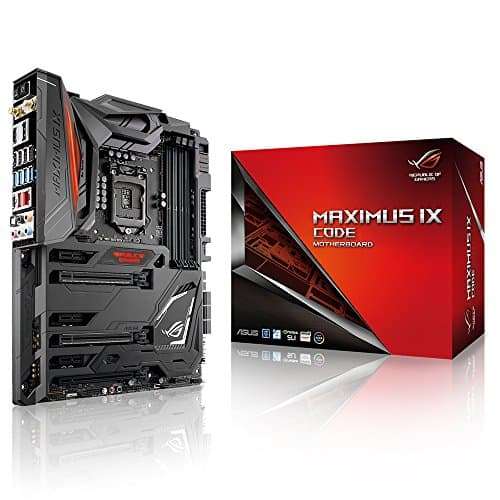
The 6th and 7th Gen chips (like the Core i7-6700K and i7-7700K) run on 100-series and 200-series motherboards (Z170, Z270, H170, B250). Legendary boards like the ASUS ROG Maximus VIII or IX Formula were luxury options in their prime, but today they should only be purchased used for $40 to $60. Do not pay inflated collector prices on eBay for older flagship motherboards when modern budget platforms offer five times the processing speed.
LGA 1151 Revision 2 (Coffee Lake: 8th & 9th Gen)
Intel introduced 6-core and 8-core desktop chips with the 8th and 9th Gen lines (i5-8400, i7-8700K, i9-9900K). Even though they share the physical 1151-pin socket layout, Intel rearranged the power pinouts. They do not work on Z170 or Z270 boards. You must use a 300-series board such as the ASUS Prime Z370-A, Z390-A, or Gigabyte Z390 Aorus Pro. On the secondary market, pay no more than $75 to $90 for a clean Z390 board.
LGA 1200 (10th & 11th Gen)
Covering CPUs like the Core i9-10900K and i5-11400F, LGA 1200 brought PCIe 4.0 support on 500-series chipsets (Z590, B560). If you have one of these CPUs, pick up a used MSI MAG B560 Torpedo or ASUS TUF Z590-Plus. Skip the high-end enthusiast boards here; spending $150+ on a dead socket makes little financial sense.
Key Features That Actually Matter
Avoid marketing fluff on product spec sheets. Focus on these three hardware factors before buying:
- VRM Quality and Heatsinks: Look for at least 8 to 12 true phases with substantial finned aluminum heatsinks if you plan to run any Core i5-K, i7, or i9. Naked PCB power delivery without heatsinks leads to thermal throttling under extended loads.
- Memory Support (DDR4 vs. DDR5): LGA 1700 gives you a choice between DDR4 and DDR5 variants of the same motherboard. DDR5 provides notable speed advantages in modern titles and creative workflows. For new builds, DDR5 is the right choice. For tight budgets where you already own 32GB of DDR4, choosing a DDR4-compatible B760 board saves substantial cash.
- Expansion & M.2 Connectivity: Ensure the board has at least two M.2 NVMe slots wired directly to CPU or high-speed chipset lanes. Integrated 2.5Gb Ethernet and Wi-Fi 6E/7 are standard features worth having over older Gigabit ports.
FAQ
Can I run an Intel Core i7 on a B760 motherboard without losing performance?
Yes, provided the B760 motherboard has high-quality VRMs and heatsinks (like the MSI B760 Tomahawk or ASUS TUF B760). While you cannot overclock the CPU multiplier on a B-series board, modern Intel chips already auto-boost to their maximum clock frequencies out of the box. As long as power limits in the BIOS are adequately configured, real-world gaming performance will match an expensive Z790 board.
Why can't I run an 8th Gen Coffee Lake CPU on a Z270 motherboard?
Although both use the physical LGA 1151 socket, Intel altered the electrical layout and power pin specifications for 8th and 9th Gen processors to supply more current to their higher core counts (up to 8 cores on the i9-9900K versus 4 cores on the i7-7700K). As a result, 8th and 9th Gen CPUs require 300-series chipsets (Z370, Z390, B360, B365).
Is DDR5 mandatory for modern Intel motherboards?
No, but it depends on the platform. LGA 1700 (12th through 14th Gen) offers dedicated DDR4 and DDR5 motherboard models, allowing you to use existing DDR4 memory sticks. The newer LGA 1851 platform (Core Ultra 200 series) exclusively uses DDR5 memory.